Agent-Readiness Auditor
Free Chrome extension · New in 1.6: WCAG accessibility overlap and live agent runs

Can AI agents actually use your website?

Agent-Readiness Auditor scores how well agents like Claude, Gemini and ChatGPT can read your page, find its buttons and finish tasks on it. Then it shows you exactly what to fix.

Runs entirely in your browser. No account, no tracking.

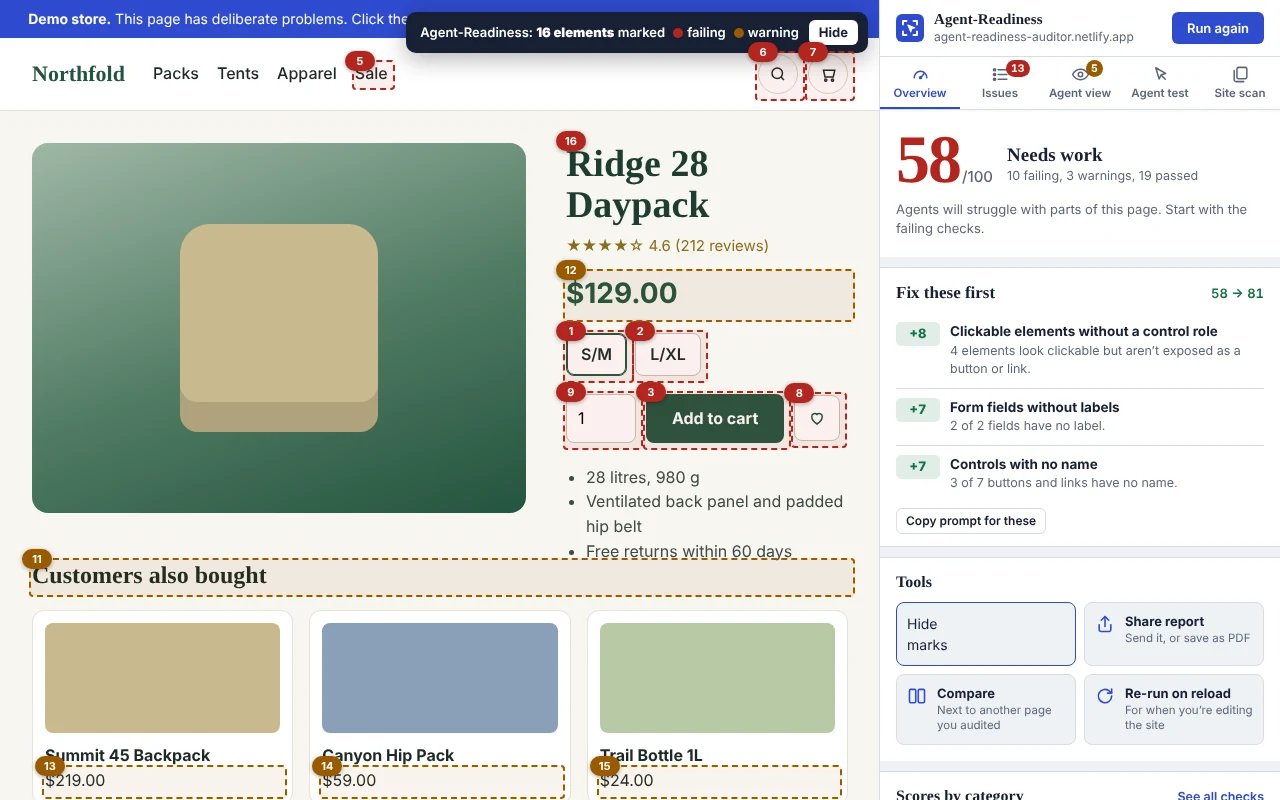
A demo shop with numbered markers on every problem element, next to the auditor’s side panel showing scores per category and “Fix these first”: three fixes that would raise the score from 58 to 81.

Why another checker?

Most “agent-ready” tools check files. This one checks whether agents can get things done.

Agents read your page through its accessibility tree, the same structure screen readers use. A button with no name, a field with no label or a cookie banner in the way can stop them cold, no matter what’s in your robots.txt.

Typical agent-readiness scores

  • Does robots.txt exist?
  • Is there an llms.txt file?
  • Are MCP and OAuth discovery files published?
  • Marks you down for standards few agents use yet

Agent-Readiness Auditor

  • Can an agent find “Add to cart” by its name?
  • Can it fill your forms correctly the first time?
  • Will overlays, CAPTCHAs or moving layouts trip it up?
  • Is hidden text trying to hijack it?

Features

Everything you need to make a page work for agents

New

Test a task the way an agent would

Type what a visitor would ask an agent to do, like “Add this backpack to the cart”. Chrome’s built-in AI reads your page exactly as agents do and plans the clicks, then the auditor shows each step on the page and where an agent would get stuck.

It runs on your computer with Gemini Nano: free, private, no API key. On computers without it, the test matches the task to control names.
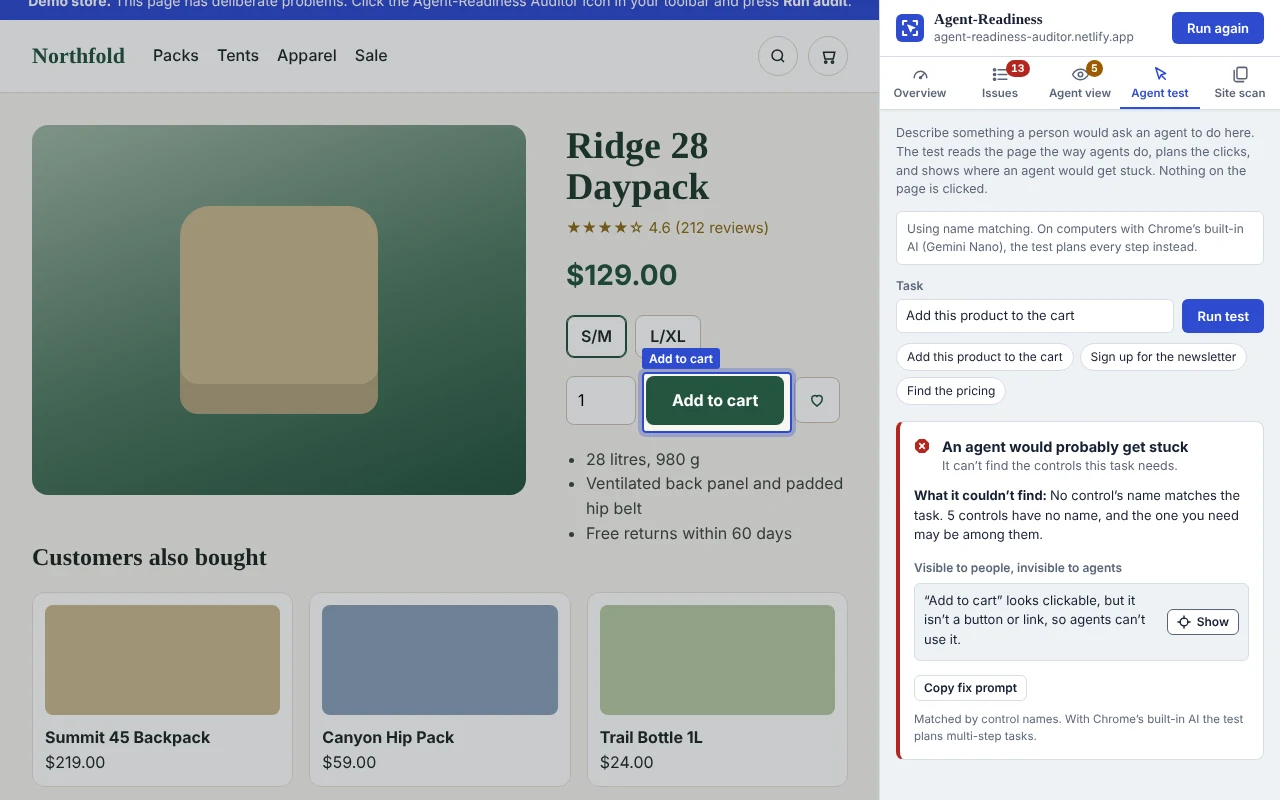
The Agent test tab: for the task “Add this product to the cart”, the verdict is that an agent would get stuck, because the page’s “Add to cart” looks clickable but isn’t a button, so agents can’t use it. The element is highlighted on the page.
New

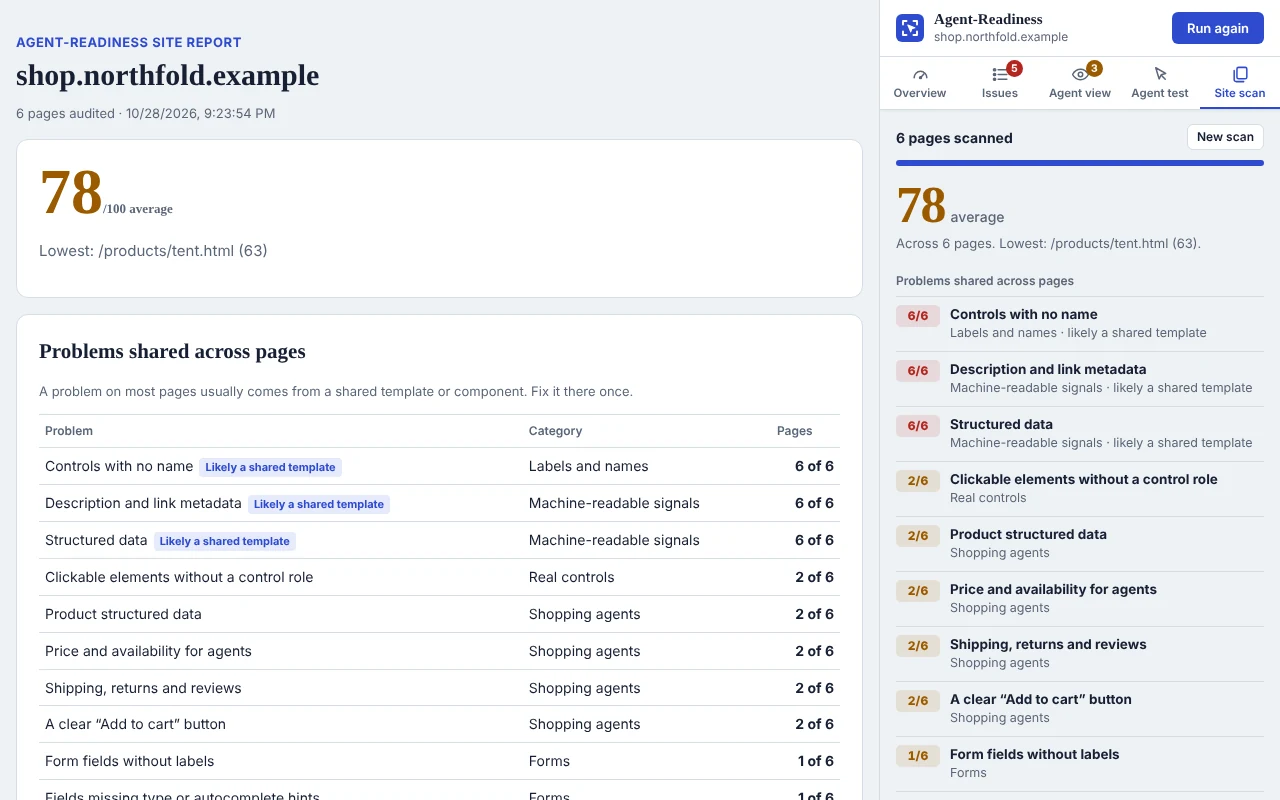
Scan your whole site, fix the template once

Audit up to 25 pages from your sitemap or navigation in one go, free. The scan shows which problems repeat across pages, and a problem on most pages almost always comes from one shared template or component.

Copy one fix prompt for the shared problems, open a site report for your team or client, or download a CSV.

A site scan of six pages with an average score of 78: unnamed controls, missing metadata and missing structured data appear on all six pages and are marked as likely coming from a shared template. A site report lists every page with its score.
New

Know what to fix first, and see it all on the page

Fix these first picks the three changes worth the most points and shows the score you’d reach. Mark issues on page puts a numbered marker on every problem element at once; hover a number for details.

Numbered red and amber markers on a product page’s problem elements, with the side panel’s Fix these first list.

See your page the way an agent reads it

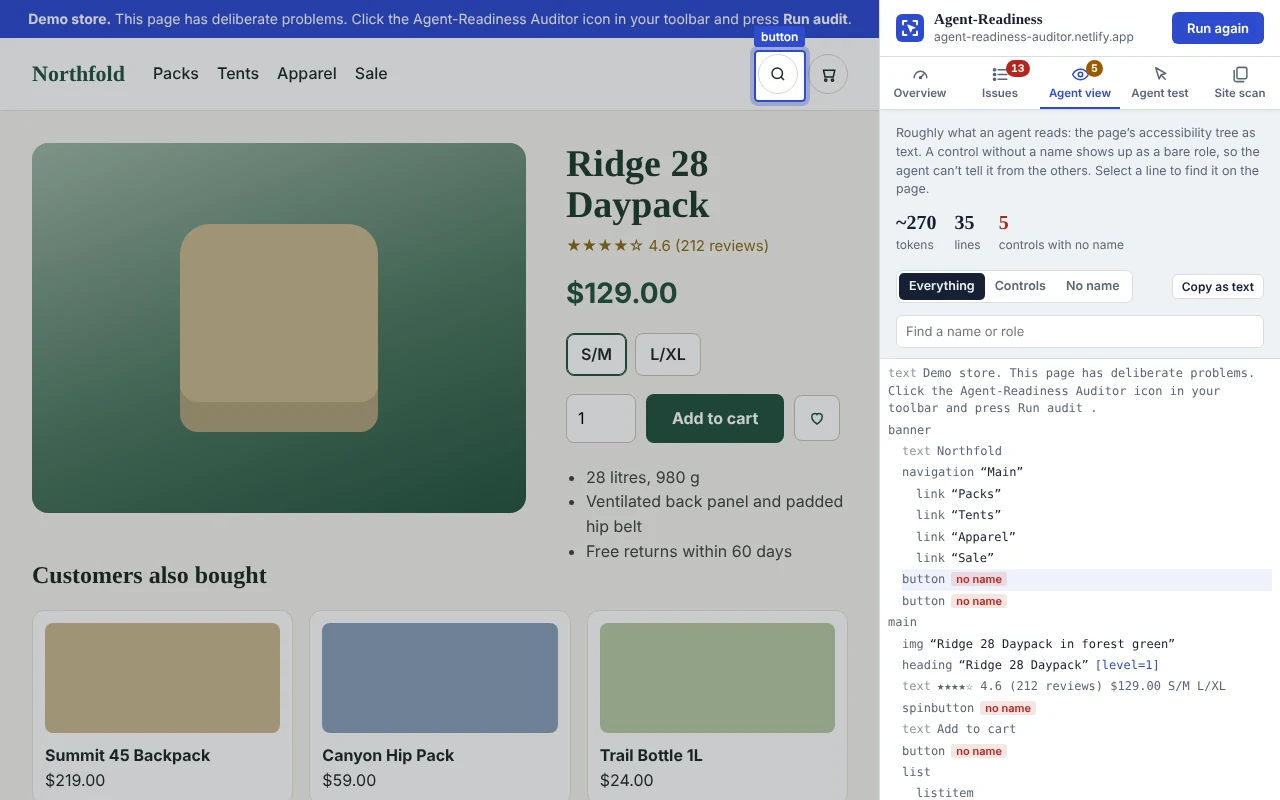
The Agent view shows the page as an agent reads it: its accessibility tree as text, with a token estimate. Buttons and links with no name are flagged in red, because to an agent they’re just “button”.

Select any line to find it on the page, filter to unnamed controls, or copy the whole snapshot.

The Agent view tab listing the page as an accessibility tree, with unnamed buttons and a spin button marked “no name”, and the selected one highlighted on the page.
New

Ready for AI shopping agents?

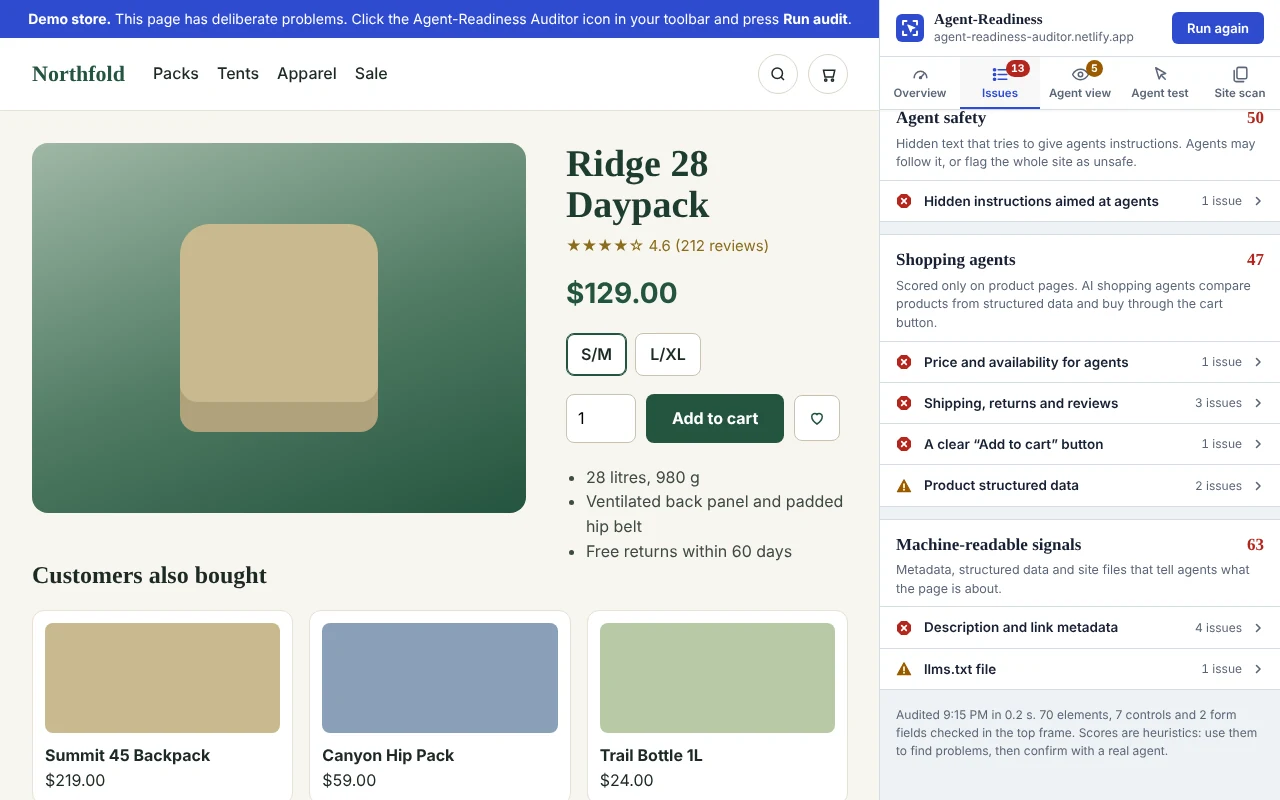
On product pages, the auditor checks what shopping agents rely on: Product structured data, price and stock (and whether the price matches the page), shipping, returns and ratings, and an “Add to cart” that’s a real, clearly named button.

The Shopping agents category on a product page: price and availability, shipping, returns and reviews, and the add-to-cart button are failing.

Hand the fixes to your coding agent, or to your client

Every problem element comes with suggested code you can copy: a real button instead of a clickable div, a label for a field, a name for an icon button guessed from the page. Or copy the whole report, the top fixes, or a single issue as a ready-made task for Claude Code, Cursor or Copilot. It tells the agent to fix each issue at its source, write a test, verify it and keep going until the checklist is done.

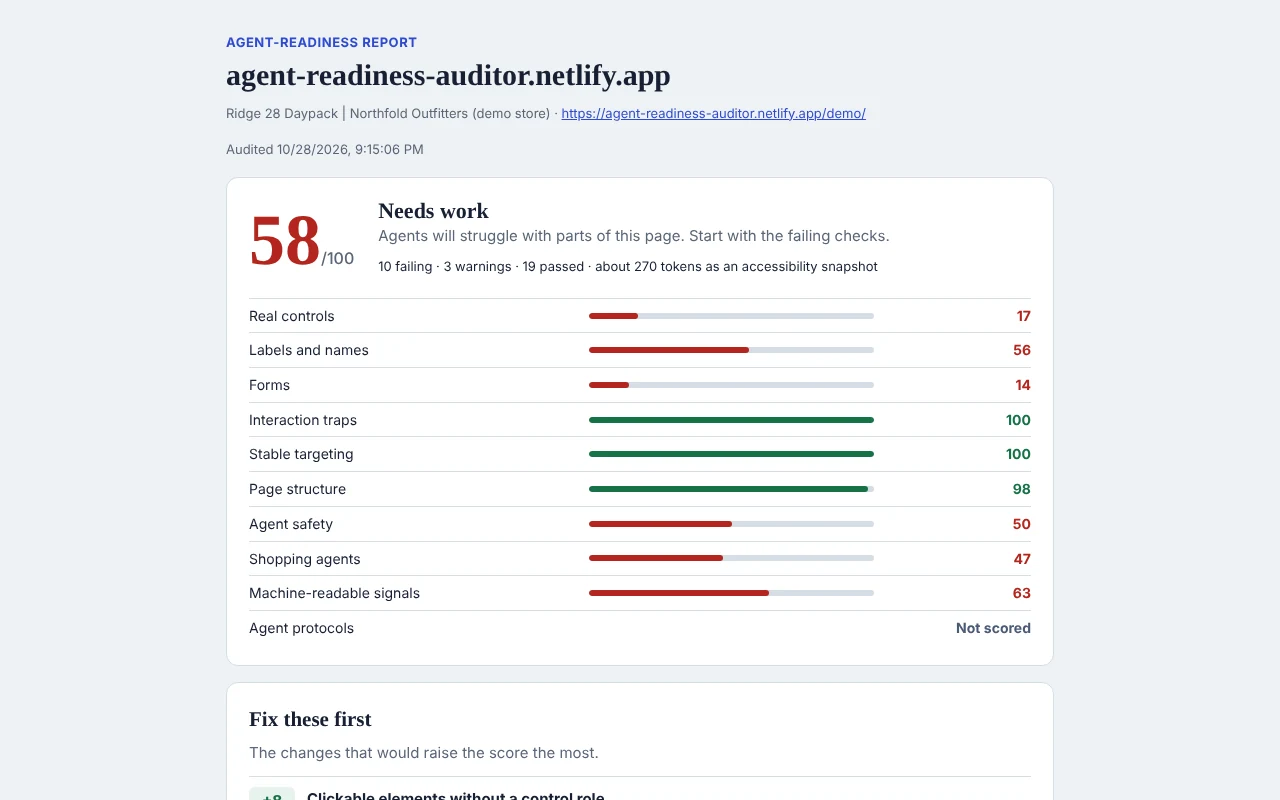
Share report makes a clean, standalone report you can send to a client or save as PDF.

# Task: fix the top 3 agent-readiness issues on this page ## Loop 1. Locate 2. Fix 3. Test 4. Verify 5. Record ## Checklist - [ ] 1. Failing: Clickable elements without a control role - [ ] 2. Failing: Form fields without labels - [ ] 3. Failing: Controls with no name
A shareable agent-readiness report: the score, a bar for each category and the first of the Fix these first items.

Prompt-injection check

Finds hidden text aimed at AI, like “ignore previous instructions” in an off-screen span or an HTML comment.

Changes since last audit

Run it again after a fix to see your score change and which issues are fixed, new or reduced.

Score on the icon

After an audit, the toolbar icon shows the page’s score, so you see it at a glance as you work.

Compare with a competitor

Put your page next to any page you’ve audited: scores by category, and where each one does better.

Re-run on reload

Editing your site? The audit runs again every time you save and the page reloads.

Suggested code

Corrected markup for each problem element, native HTML first, ready to copy. On-device AI can suggest names for unnamed buttons.

Weekly re-scan alerts

Turn it on after a site scan. The same pages are checked every week, and you get an alert if the score drops.

Command line and MCP

Fail a CI build below a score with npx agent-readiness-audit, or let Claude Code and Cursor audit pages through MCP.

In your language

English, Español, Deutsch, 日本語, Português and বাংলা, following your Chrome language.

What it checks

42 checks in ten areas

Each area gets a score, weighted into one overall score from 0 to 100. Checks that don’t apply to the page are left out rather than counted against you.

20%

Real controls

Clickable divs that aren’t real buttons, links that go nowhere, controls the Tab key skips, no visible focus.

20%

Labels and names

Icon-only buttons, vague names like “Click here”, missing alt text, misleading ARIA.

15%

Forms

Unlabeled fields, missing input types and autocomplete hints, unmarked required fields.

15%

Interaction traps

Cookie banners and overlays, CAPTCHAs, cross-origin frames, tiny targets, layout shifts. Shadow DOM and same-site frames are checked too.

12%

Stable targeting

Controls only reachable by generated class names or auto-generated IDs.

12%

Page structure

Title, language, landmarks, headings, page size, content that needs JavaScript.

10%

Shopping agents

Only on product pages: Product data, price and stock, shipping, returns, ratings, a clear Add to cart.

6%

Agent safety

Hidden text that reads like instructions to an AI agent.

6%

Machine-readable signals

Meta description, Open Graph, structured data, llms.txt, robots.txt rules for AI.

Info

Agent protocols

Markdown for agents, MCP server card, API and OAuth discovery, Content Signals, WebMCP.

How it works

An audit takes about a second

Open any page

Your site, a competitor’s, or a staging build. It works on any regular web page.

Click the icon

Or press Alt+Shift+A. The side panel opens next to the page and the audit starts.

Fix and re-run

Work through the issues yourself or hand them to a coding agent, then audit again to see what changed.

Private by design

Your pages never leave your browser

The audit runs inside Chrome on the page you choose. The extension has no servers, so there’s nothing to send your data to.

Read the privacy policy
  • No accountInstall and go.
  • No trackingNo analytics or third-party code.
  • On demandReads a page only when you click.
  • Minimal permissionsNo site access at install.

FAQ

Questions

Which agents does this help with?

Any agent that reads web pages through the accessibility tree or the DOM, including Claude in Chrome, Gemini in Chrome, ChatGPT agent, Perplexity Comet and agents built on Playwright or browser-use. Agents that work from screenshots benefit too: real buttons, clear names and stable layouts help them as well.

Isn’t this just an accessibility checker?

There’s a lot of overlap, because agents and screen readers read the same structure, and the extension shows it: checks that are also WCAG 2.2 failures are marked with their success criteria, and a WCAG filter lists them. But it also checks things accessibility tools don’t: hidden prompt injections, content that only appears after JavaScript runs, selectors that break on every release, how many tokens come before your main content, and agent protocols like MCP and WebMCP.

Do I need llms.txt or an MCP server to score well?

No. Protocol files are shown for information and don’t affect the score. Few sites publish them and few agents read them yet. Whether an agent can actually use your page matters far more.

Does the Agent test send my page to an AI service?

No. It uses Chrome’s built-in model, Gemini Nano, which runs on your computer. Chrome downloads it once, on the first test, if your computer meets Chrome’s requirements. Without it, the test matches your task to control names inside the extension. Nothing leaves your browser either way. Press Run the steps to watch the plan carried out on the live page in a background tab; it never pays, places orders, deletes anything or types personal details.

Can it check my whole site?

Yes, up to 25 pages at a time, for free. Open the Site scan tab, choose pages from your sitemap or your navigation, and the extension audits them one by one in a background tab. It asks for access to that one site only.

Can I run it in CI or from a coding agent?

Yes. The same checks are available as a command line tool: npx agent-readiness-audit http://localhost:3000 --min-score 80 fails the build when the score drops below 80. Run npx agent-readiness-audit mcp as an MCP server and coding agents like Claude Code or Cursor can audit a page, fix it and audit again on their own.

Which languages does it support?

The extension follows your Chrome language: English, Spanish, German, Japanese, Portuguese (Brazil) and Bengali. Exported reports and prompts for coding agents stay in English.

Does it cost anything?

No. The extension is free, with no account and no usage limits.

How accurate is the score?

The checks are heuristics: they find likely problems fast and point to the exact elements. Use the score to find and prioritize fixes, then confirm with a real agent run on your most important flows.

Find out what agents see on your site

Free, private, and ready in a few seconds.

Add to Chrome